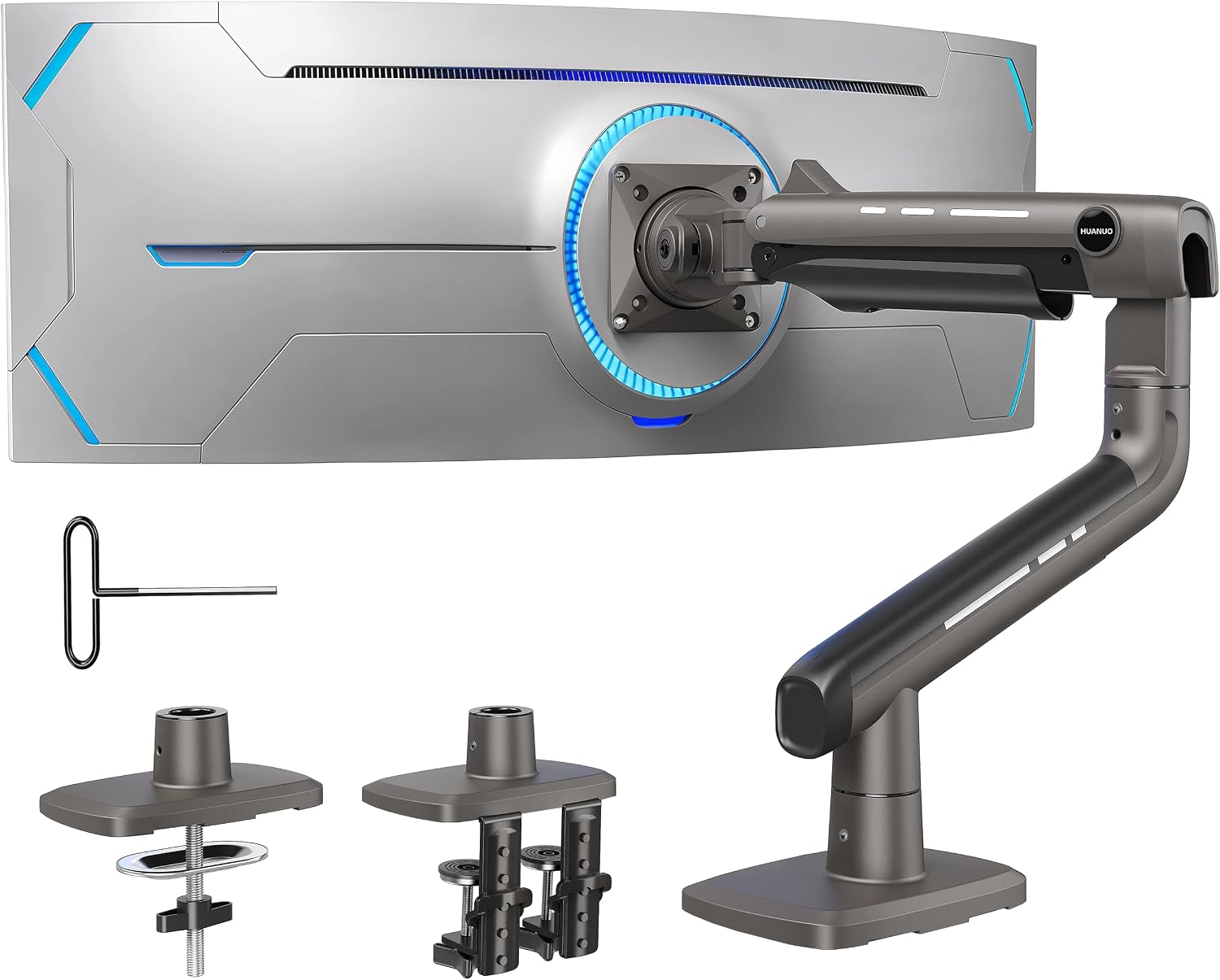
For an ultrawide monitor, pick an arm whose listed screen size and weight limit cover your panel with room to spare: the HUANUO TitanLift and the FlexiSpot ultrawide arm both list screens up to 49 in and 44 lb, the highest weight limit in this group.


Quick Comparison
| Model | Screen size | Weight limit | Desk thickness (clamp) | Warranty | Best for |
|---|---|---|---|---|---|
| HUANUO TitanLift (HNSS48B) | 17 to 49 in | 6.6 to 44 lb | 0.8 to 3.5 in | Field reads “5”, no unit | Heavy 49 in panel on a wood desk |
| FlexiSpot ultrawide arm | 17 to 49 in | Up to 44 lb | Up to 2.17 in | 5 years | Gas spring adjustment, 49 in panel |
| ErGear heavy duty arm (HNSS47) | 13 to 49 in | Up to 37.4 lb | 0.39 to 3.15 in | 10-year | Mid-weight panel, thick or thin desk |
| Ergotron LX (45-241-224) | Up to 34 in | 7 to 25 lb | 0.4 to 2.4 in | 10 years | 34 in ultrawide |
| Ergotron NX (45-669-216) | Up to 34 in | 0 to 18 lb | Up to 2 in | 5 years | Light 34 in ultrawide |
Source: the listing gives every figure in this table; Ergotron’s site returned an access error and the HUANUO home page names no arm models, so confirm the numbers with the maker before you buy. Checked November 2026.
How We Chose
The job: a single arm for a 34 in to 49 in ultrawide on a desk 48 to 60 in wide. We kept arms whose listing states a screen size of at least 34 in, a weight limit, and VESA 75×75 and 100×100 mm. We research and compare; we do not run our own product trials. Our figures come from listing text, FlexiSpot’s monitor arm guide, and the width formula below. The Desk & Bench Score on each card reflects verified buyer ratings, not our editorial rubric; see how it works.
Check your own panel first. Width = diagonal x ratio width / the square root of (ratio width squared + ratio height squared). A 34 in 21:9 panel is 34 x 21 / 22.85 = about 31 in wide. A 49 in 32:9 panel is 49 x 32 / 33.24 = about 47 in wide, nearly all of a 48 in desk. FlexiSpot’s monitor arm guide says to know each display’s weight, including attached accessories, and to match the arm’s VESA pattern.
The Picks
1. HUANUO TitanLift
The listing gives 44 lb, 17 to 49 in screens, 22.5 in of extension, 19.6 in of height measured to the center of the VESA mount, and tension set with an Allen key. It recommends wooden desks only, with no cross beams or panels under the desk where the clamp sits.
Best for: a 49 in panel on a wooden desk. Avoid if: your desk is glass or plastic, or has a crossbar under the clamp spot.
2. FlexiSpot ultrawide arm
The listing gives a gas spring arm for 17 to 49 in screens up to 44 lb, 24.5 in of extension, a C-clamp for desks up to 2.17 in thick, and an optional grommet mount. Its tilt is listed as -90 to 15 degrees.
Best for: a 49 in panel on a desk up to 2.17 in thick. Avoid if: your panel weighs more than 44 lb or your desk is thicker than 2.17 in.
3. ErGear heavy duty arm
The listing gives 37.4 lb, 13 to 49 in screens, a clamp for 0.39 to 3.15 in desks, a grommet mount for 0.39 to 2 in, and a 10-year warranty. Its 37.4 lb limit sits 6.6 lb below the two 44 lb arms (44 minus 37.4 = 6.6).
Best for: a panel up to 49 in that weighs less than 37.4 lb. Avoid if: your panel weighs more than 37.4 lb.
4. Ergotron LX
The listing gives single screens up to 34 in and 7 to 25 lb, a 0.4 to 2.4 in desk clamp, 13 in of lift, and a 10-year warranty. Its 7 lb weight floor means a very light panel falls outside the range. For gas spring versus mechanical, see our comparison.
Best for: a 34 in ultrawide between 7 and 25 lb. Avoid if: your screen is 35 in or larger.
5. Ergotron NX
The listing gives up to 34 in, 0 to 18 lb, a clamp for desks up to 2 in, a 13 in pole, 35 degrees of tilt, and a 5-year warranty.
Best for: a light ultrawide up to 34 in and 18 lb. Avoid if: your panel weighs more than 18 lb.
Cost of Ownership
Arms use no consumables. The extra costs are an upgrade if your next monitor outgrows the limit, and the warranty gap: 10 years on the ErGear and LX listings against 5 on the NX and FlexiSpot. For one more panel beside this one, read our two-monitor arms.
Compatibility
- VESA: all five list 75×75 and 100×100 mm.
- Standing desks: check the listed clamp range against your top thickness and look for a crossbar under the clamp spot. See what a monitor arm is.
- Our general monitor arm guide covers 34 in and smaller panels in more depth.
FAQ
Does the 49 in limit mean diagonal?
Screen size is a diagonal measure. The Ergotron listings say so; the other three do not, so confirm with the maker. The width is smaller, about 47 in for a 32:9 panel.
Should I use the full weight limit?
Count attached accessories toward the limit, as FlexiSpot’s guide advises, and compare the total with the listed weight range.
Where do I find the monitor’s weight?
In the monitor maker’s spec sheet; check whether the figure includes the stand.
Changelog: November 2026: first published.