

If you already own a standing desk, the accessory with the widest listed thickness range here is the clamp-on monitor arm (0.59 to 3.54 in, against 0.4 to 2.4 in for the cable tray and up to 1.25 in for the keyboard tray), and it frees desktop depth. A cable tray, a keyboard tray, and a floor mat each solve a narrower problem, and each has a thickness or size limit you can check in a minute with a tape measure.


Quick Comparison
| Accessory | Job | Key limit (listing) | Best for |
|---|---|---|---|
| HUANUO FlowLift Single Monitor Mount (HNSS6) | Raise one screen off the desk | 4.4 to 19.8 lb; VESA 75×75 or 100×100 mm; 5-year warranty | One monitor, top 0.59 to 3.54 in thick |
| Litwaro Under Desk Cable Management Tray | Hold power strips and adapters | About 15 lb; desk edge 0.4 to 2.4 in; 1-year warranty | Clamp-on cable storage without drilling |
| VIVO Clamp-on Keyboard and Mouse Tray (MOUNT-KB05E) | Move the keyboard below the top | 11 lb; desk up to 1.25 in thick; 32.5 in clamp to clamp | Desks with a square front edge |
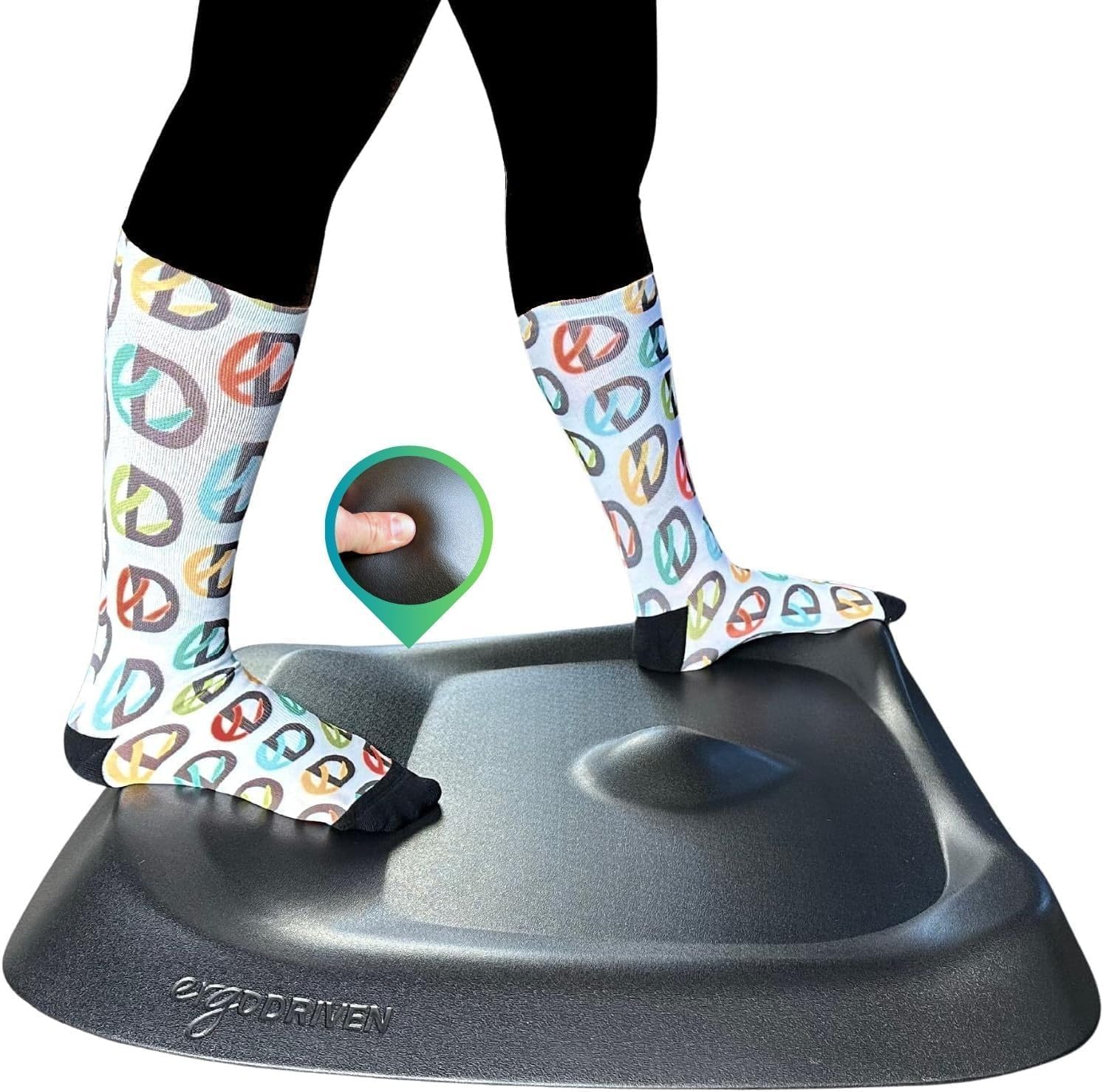
| Ergodriven Topo mat | Floor mat in front of the desk | 29 x 26.25 x 2.7 in | Clear floor area in front of the desk |
Source: Amazon listings for each model, checked November 2026; the makers’ own pages for these models were not readable, so confirm figures with the maker.
How We Chose
The job: add-ons for a standing desk you already own, with a top between 1 and 1.25 in thick and a frame that raises and lowers. Each pick needs a stated size or weight limit, so the question is whether it fits your top, not whether it is popular. We research and compare; we do not run our own product trials. These picks come from listings, spec data, and public owner feedback. Scores on the cards are normalized buyer ratings, not editorial grades; see how the score works.
HUANUO FlowLift Single Monitor Mount
- The listing gives 4.4 to 19.8 lb, VESA 75×75 and 100×100 mm, and a clamp or grommet mount on tops 0.59 to 3.54 in thick.
- The listing title says 13 to 32 in; its size field says 17 to 27 in. Check the screen size against HUANUO before buying.
- The listing states a 5-year warranty. For more arm choices, see best monitor arms.
- Best for: one monitor weighing 4.4 to 19.8 lb on a top 0.59 to 3.54 in thick.
- Avoid if: your monitor has no VESA mounting holes or is outside the listed 4.4 to 19.8 lb range.
Litwaro Under Desk Cable Management Tray
- The listing gives a 13.4 x 4.72 in metal mesh tray that clamps to a desk edge 0.4 to 2.4 in thick, no drilling.
- It holds about 15 lb per the listing, enough for a power strip and a few adapters.
- Warranty per the listing: 1 year. Routing advice is in our standing desk cable management guide.
- Best for: hiding a power strip under a top with a flat edge.
- Avoid if: your top has a lip, crossbar, or frame rail along the edge that blocks the clamp.
VIVO Clamp-on Keyboard and Mouse Tray
- The listing gives a 26.8 in tray (32.5 in with clamps), 11 lb capacity, and a 1.25 in maximum desktop thickness.
- It extends up to 8.5 in from the desk edge, and the listing says it does not fit beveled edges.
- Mounting height matters on a standing desk; see keyboard height at a standing desk.
- Best for: a 1 in thick top with a square edge and at least 32.5 in of free width.
- Avoid if: your top is thicker than 1.25 in or has a beveled edge.
Ergodriven Topo Mat
- The listing gives 29 x 26.25 x 2.7 in, polyurethane foam, and an 8 lb weight, and calls it an anti-fatigue mat. The listing describes the surface as raised “terrain” you can step on.
- The listing says the mat can be moved with one foot using an indentation on its edge, and gives a 7-year manufacturer’s warranty.
- Best for: a clear floor area of at least 29 x 26.25 in in front of the desk.
- Avoid if: you need a flat floor for a rolling chair in that area; the mat is 2.7 in thick.
Cost of Ownership
None of these needs a subscription or consumable, so cost is the purchase plus fit. Warranty terms in the listings: 1 year on the cable tray, 5 years on the monitor mount, and 7 years on the mat; the keyboard tray listing gives none. Weight check, using assumed weights of 2 lb for a keyboard and 0.3 lb for a mouse (not from any source): against the 11 lb tray limit that leaves wide margin, while a monitor over 19.8 lb exceeds the arm’s listed limit.
Compatibility
Measure three things first: top thickness, edge shape, and free width under the front edge. Thickness limits from the listings: cable tray 0.4 to 2.4 in, keyboard tray up to 1.25 in, monitor mount 0.59 to 3.54 in. On a frame-and-top desk built from a separate top, the thickness is the top plus any lip; see building a standing desk. This is fit guidance, not medical advice; if you have pain or a health condition, talk to a qualified health professional before choosing equipment.
FAQ
Do these accessories work with every standing desk?
Only within the limits above. Thickness and edge shape decide the clamp fit; the desk frame does not matter.
Should I buy a keyboard tray or raise the desk?
If the desk lowers to your seated elbow height, you may not need the tray. If it does not, a tray gets the keyboard below the top; check keyboard height first.
Changelog: November 2026: first published.









