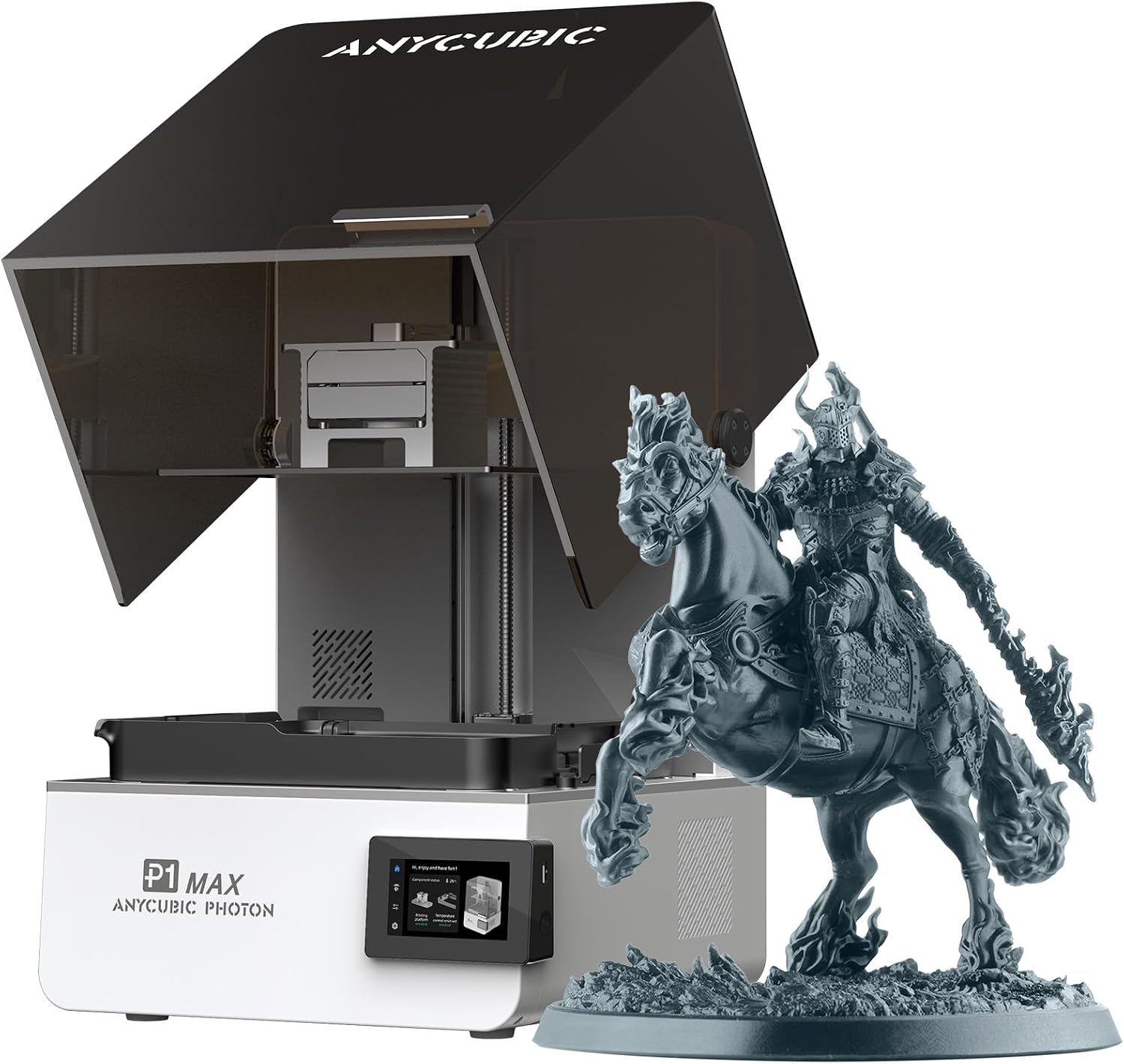
If raw capability decides it, Anycubic’s Photon P1 Max leads on stated build volume, 285.5 by 214 by 300 mm, about 18.3 L by our arithmetic. Among the compact models, the Photon Mono 4 Ultra pairs the smallest stated pixel with the highest speed that its maker ties to a layer height and resin.


Quick Comparison
| Printer | Build volume (mm) | XY pixel | Max speed, as stated | Source |
|---|---|---|---|---|
| Anycubic Photon P1 Max | 285.5 x 214 x 300 (18.3 L) | 24.8 µm | 15 to 25 mm/h (0.05 mm layer, standard resin) | Anycubic page |
| Anycubic Photon Mono 4 Ultra | 153.4 x 87 x 165 (2.2 L) | 17 µm | 120 mm/h (0.1 mm layer, High Speed Resin 2.0) | Anycubic page |
| Anycubic Photon Mono 4 | 153.4 x 87 x 165 (2.2 L) | 17 µm | 70 mm/h (0.1 mm layer, High Speed Resin) | Anycubic page |
| ELEGOO Mars 5 Ultra | 153.36 x 77.76 x 165 | 18 µm | 150 mm/h (conditions not given) | ELEGOO page |
| ELEGOO Mars 5 | 143.43 x 89.6 x 150 | 35 µm | 70 mm/h (conditions not given) | ELEGOO page |
Source: ELEGOO and Anycubic product pages, checked November 2026. Volume in liters is Anycubic’s figure for its models and our arithmetic (length x width x height) for ELEGOO: about 1.97 L for the Mars 5 Ultra and 1.93 L for the Mars 5.
How We Chose
The job: one resin printer for general use, from small parts to larger batches. Our order is the stated build volume first, then the smaller XY pixel, then the higher maker-stated speed. The Mono 4 pair share volume and pixel size, so speed puts the Ultra first. Our reading: the volume gaps among the four compact models are small (2.20 L is about 12% more than 1.97 L and about 14% more than 1.93 L, our arithmetic), so check the footprint of your own parts. The Desk & Bench Score reflects verified buyer ratings only. We research and compare; we do not run our own product trials. Method: How We Choose. More in resin printer guides.
Our Picks
Anycubic Photon P1 Max
Anycubic lists a 14 inch 12K screen, a 1.9 L heated vat (dynamic temperature control), dual linear guides with ball screws, and Wi-Fi plus Ethernet. Its speed figure is stated for 0.05 mm layers on standard resin, so it is not directly comparable to the 0.1 mm figures on the 7 inch models. Anycubic lists 296 W for the power supply. Its 24.8 µm pixel is larger than the 17 to 18 µm pixels of the 7 inch models.
Best for: large single parts or full-plate batches.
Avoid if: your bench cannot take a machine listed at 430 by 414 by 625 mm, or, in our reading, you print mostly small, fine figures.
Anycubic Photon Mono 4 Ultra
Anycubic lists 120 mm/h with High Speed Resin 2.0 at 0.1 mm layers (up to 80 mm/h on standard resin), an ACF release film, and a light uniformity of 90% or more. The power supply is listed at 66 W, with USB and Wi-Fi transfer.
Best for: compact builds where speed and a 17 µm pixel both matter.
Avoid if: you need a plate larger than 153.4 by 87 mm.
Anycubic Photon Mono 4
The same plate and pixel as the Ultra, with up to 70 mm/h on High Speed Resin, a 54 W power supply, an FEP film, and USB-only transfer.
Best for: the Ultra footprint with a simpler specification.
Avoid if: you want Wi-Fi transfer or the higher speed figure.
ELEGOO Mars 5 Ultra
ELEGOO lists up to 150 mm/h through tilt release, an 18 µm pixel, and a 7 inch 9K screen with USB and Wi-Fi. ELEGOO gives no layer height for the speed figure, so it is not directly comparable to Anycubic’s 0.1 mm figures.
Best for: speed-first work, in our reading, with the caveat that the 150 mm/h figure has no stated conditions.
Avoid if: you need a plate deeper than 77.76 mm; the Anycubic 7 inch models list 87 mm.
ELEGOO Mars 5
A 6.6 inch 4K screen with a 35 µm pixel, the largest XY pixel in this group, and a stated 70 mm/h.
Best for: larger-feature parts on the lowest-resolution screen here.
Avoid if: you print fine detail.
Running Cost: Electricity
Using how we figure it: electricity = print hours x watts / 1,000 x your rate per kWh. Power supply figures from the maker pages: Mono 4 Ultra 66 W, Mono 4 54 W, P1 Max 296 W; ELEGOO lists 24 V at 3 A, or 72 W by our arithmetic. Our reading: these are upper limits, not average draw, so a 10 hour print at 66 W is at most 0.66 kWh. Resin, wash liquid and release film are extra.
Safety and Compatibility
Work in a ventilated space, wear nitrile gloves and eye protection, and follow the safety data sheet (SDS) from the resin maker and the instructions from the printer maker. Prusa’s resin help page (relevant for the SL1 and SL1S SPEED) says resin produces fumes and recommends a simple respirator. We do not rate how safe any resin is. Anycubic lists the P1 Max as compatible with All Anycubic Resins; the other models list water-washable, standard, ABS-like and plant-based types. Read how resin printing works and how it compares in FDM vs resin strength. Also see best resin printers for beginners and for miniatures.
FAQ
Is a bigger build volume always better?
No. The P1 Max is listed at 430 by 414 by 625 mm with a 296 W power supply, and its 24.8 µm pixel is larger than the 17 to 18 µm of the 7 inch models.
Are the speed figures comparable?
Only where the layer height and resin match. Anycubic ties its figures to 0.1 mm layers and named resins; ELEGOO’s pages state none.
Which one suits a beginner?
Our resin guide for beginners ranks setup aids, not capability.
Changelog: November 2026: first published.